How to Create a Knest Login Form Using HTML, CSS, JS & PHP

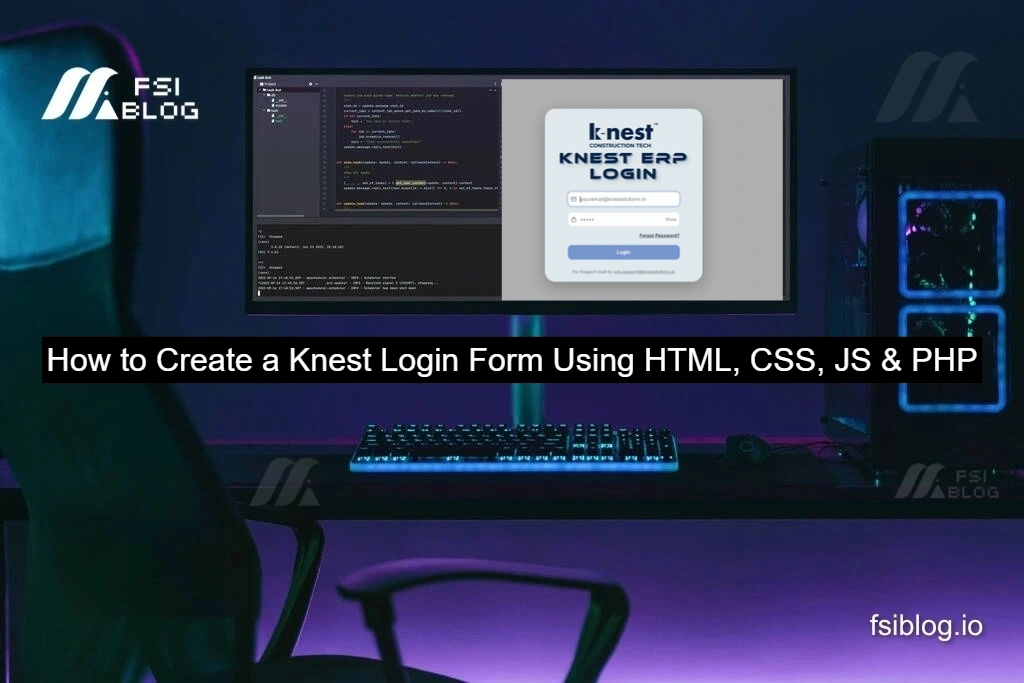
A professional login system is an essential part of any ERP or business application. We’ll build a Knest-style ERP Login Form using HTML, CSS, JavaScript, and PHP, inspired by the clean UI shown in the screenshot.
This tutorial provides a ready-made, prebuilt login form that you can copy, run, and customize for your own projects.
Login Form Features
✔ Centered card layout with rounded corners
✔ Email & password input with icons
✔ Show / Hide password button
✔ “Forgot Password?” link
✔ Secure PHP login with sessions
✔ Responsive design
✔ Ready-to-use project structure
Project Folder Structure
Create a folder named knest-login and add the following files:
knest-login/
├── index.php
├── style.css
├── script.js
├── login.php
├── dashboard.php
├── logout.php
└── forgot-password.php
Create the Login Page (index.php)
This file contains the HTML layout and login form UI.
<?php
session_start();
if (empty($_SESSION['csrf'])) {
  $_SESSION['csrf'] = bin2hex(random_bytes(32));
}
$error = $_SESSION['error'] ?? '';
unset($_SESSION['error']);
?>
<!DOCTYPE html>
<html lang="en">
<head>
<meta charset="UTF-8">
<title>Knest ERP Login</title>
<link rel="stylesheet" href="style.css">
</head>
<body>

<div class="login-container">
  <div class="login-card">

    <h1 class="logo">k-nest™</h1>
    <p class="sub">CONSTRUCTION TECH</p>

    <h2 class="title">KNEST ERP<br>LOGIN</h2>

    <form action="login.php" method="POST" id="loginForm">
      <input type="hidden" name="csrf" value="<?= $_SESSION['csrf'] ?>">

      <input type="email" name="email" placeholder="youremail@knestaluform.in" required>
      <input type="password" name="password" id="password" placeholder="•••••" required>

      <button type="button" id="toggle">Show</button>

      <a class="forgot" href="forgot-password.php">Forgot Password?</a>

      <?php if ($error): ?>
        <p class="error"><?= $error ?></p>
      <?php endif; ?>

      <button type="submit" class="btn">Login</button>
    </form>

    <p class="support">
      For Support mail to:<br>
      <a href="mailto:erp.support@knestaluform.in">erp.support@knestaluform.in</a>
    </p>

  </div>
</div>

<script src="script.js"></script>
</body>
</html>
Style the Login UI (style.css)
This CSS creates the rounded ERP login card, shadows, and layout similar to the screenshot.
body{
  margin:0;
  font-family:Arial, sans-serif;
  background:#bfbfbf;
}

.login-container{
  height:100vh;
  display:flex;
  justify-content:center;
  align-items:center;
}

.login-card{
  background:#e9f0f6;
  width:420px;
  padding:40px;
  border-radius:40px;
  text-align:center;
  box-shadow:0 20px 40px rgba(0,0,0,0.25);
}

.logo{
  font-size:48px;
  font-weight:900;
  margin:0;
}

.sub{
  font-size:14px;
  letter-spacing:2px;
}

.title{
  font-size:36px;
  font-weight:900;
  margin:20px 0;
}

input{
  width:100%;
  padding:14px;
  margin:10px 0;
  border-radius:12px;
  border:1px solid #ccc;
  font-size:16px;
}

#toggle{
  background:none;
  border:none;
  font-weight:bold;
  cursor:pointer;
  margin-bottom:10px;
}

.forgot{
  display:block;
  margin-bottom:16px;
  font-weight:bold;
}

.btn{
  width:100%;
  padding:14px;
  background:#6f8fc0;
  color:#fff;
  border:none;
  border-radius:12px;
  font-size:16px;
  font-weight:bold;
  cursor:pointer;
}

.support{
  font-size:14px;
  margin-top:18px;
}

.error{
  color:red;
  font-weight:bold;
}
Add JavaScript Logic (script.js)
This script handles the Show / Hide password feature.
const toggle = document.getElementById("toggle");
const password = document.getElementById("password");

toggle.addEventListener("click", () => {
  if (password.type === "password") {
    password.type = "text";
    toggle.textContent = "Hide";
  } else {
    password.type = "password";
    toggle.textContent = "Show";
  }
});
PHP Login Processing (login.php)
This file validates credentials and starts a session.
Demo login credentials:
- Email:
admin@knestaluform.in - Password:
Admin@123
<?php
session_start();

if ($_SERVER["REQUEST_METHOD"] !== "POST") {
  header("Location: index.php");
  exit;
}

if ($_POST['csrf'] !== $_SESSION['csrf']) {
  $_SESSION['error'] = "Invalid request.";
  header("Location: index.php");
  exit;
}

$email = $_POST['email'];
$password = $_POST['password'];

$demoEmail = "admin@knestaluform.in";
$demoHash = password_hash("Admin@123", PASSWORD_DEFAULT);

if ($email === $demoEmail && password_verify($password, $demoHash)) {
  $_SESSION['user'] = $email;
  header("Location: dashboard.php");
  exit;
}

$_SESSION['error'] = "Invalid login credentials.";
header("Location: index.php");
Dashboard Page (dashboard.php)
<?php
session_start();
if (!isset($_SESSION['user'])) {
  header("Location: index.php");
  exit;
}
?>
<h2>Welcome to Knest ERP Dashboard</h2>
<p>You are logged in as <?= $_SESSION['user']; ?></p>
<a href="logout.php">Logout</a>
Logout (logout.php)
<?php
session_start();
session_destroy();
header("Location: index.php");
How to Run This Project
- Install PHP
- Place folder in
htdocs(XAMPP) or run:php -S localhost:8000 - Open browser:
http://localhost:8000/index.php
Final Thought
This Knest ERP login form provides a clean, secure, and ready-to-use foundation for any PHP-based application. With a modern UI, client-side validation, and session-based authentication, it’s ideal for ERP systems, admin panels, or business dashboards. You can use this setup as-is or easily extend it with database integration, role management, and enhanced security features as your project grows.